WordPress 4 is out
And to make tinkering even more fun challenging, I learned that WordPress 4 just released along with a bunch of updates for WP plugins.
And to make tinkering even more fun challenging, I learned that WordPress 4 just released along with a bunch of updates for WP plugins.

So with the opportunity to test out an Android-based smart phone, I went for it and am now the user of an LG G3. The G3 got a solid review from The Verge praising it for being an Android device without too many manufacturer extras getting in the way. Then there’s the big 5.5 inch screen. Boy, it’s big. My entire iPhone 5 fits within the borders of the G3’s display. But how does that bordering-too-big screen translate to the user experience? I’ll have to keep testing to find out.
So expect to see some Android-centric posts popping up at Pulpconnection. You’ve been warned.
About two weeks ago, my Kickstarter-backed Juicies+ cable arrived after a few delays in production. I went with the gold to change up the collection of white and black cables, and yes, the gold is nice, not gaudy.
Some things to note about Juicies+. It’s bigger than the Apple Lightning cable. The Juicies+ is longer, and the connector casings are fatter. Of course, the connectors themselves follow specs and standards. The fatter Juicies+ Lightning connector fits my cased iPhone 5 and works as expected and fashionably too.


Instead I used the difference in costs between the basic and Plus models to buy a larger hard drive. The basic comes with a 500 GB drive that can record up to 500 hours. I got a highly rated WD Red 2 TB drive to replace the stock drive. I was thinking of getting the AV-tuned, Green line of WD drives, but the cost was more, and Amazon reviews said the Red line works just as well in a Tivo. Again because of costs, I didn’t go all the way with a 4 TB drive. As is, this 500 GB to 2 TB increase quadruples recording time which is good enough for my recording habits.

Anyways, upgrading the internal drive in the Roamio is very easy now. No special software utilities needed. Just swap out the physical hardware, and the Tivo firmware takes care of the rest upon startup. For more details about the hard drive upgrade, check out this Tivo Community thread.
Getting the side clips unclasped was the hardest part of the upgrade in my opinion. Unmounting the original drive just takes time and patience to remove the screens and mounting brackets.

If you’re installing a CableCard (multi-stream only), look on the underside of the Roamio for the CableCard slot.
After putting the Tivo back together and hooking it up, the Roamio initializes the new drive and doesn’t skip a beat.

What can I say? The Roamio is way faster than the Tivo HD. The interface is better but sometimes the old school, low resolution screens show up. The peanut shaped remote is smaller with some different button placement but is more responsive relying on RF signals rather than strictly line of sight IR.
I connected the Roamio to my Tivo HD to transfer existing recorded shows. For speed, I connected the two units with an Ethernet cable (straight through, not a crossover). The Roamio saw the HD unit whereupon I could transfer its content to the Roamio. After several hours, this process was done (truthfully I thought this would take much longer).
So far so good with the Roamio although I went through the settings to stop the auto-recording of suggested content. At times, I noticed the red light was illuminated indicating shows were recording. I didn’t have any applicable Season Passes scheduled so I wondered what was going on. After disabling this auto-record feature, the red light no longer goes on randomly.
Definitely a worthwhile investment for sure.
Here are more pictures of my Tivo Roamio drive upgrade.
After seeing a water filling station at the ala mater, I had to Google it to learn more. Looks like it’s from Flo Water. Interesting…wonder if we can get one for the workplace???

Aww, that’s a real bummer. Tivo has a promotion to upgrade existing customers to their new Roamio platform
And you can order a bigger drive to replace the stock drive while shopping at Amazon. Seems like the WD Green

2015?! Yes, 2015. That’s when the Vessyl smartcup is supposed to hit the market. The Vessyl knows what you’re drinking and calculates your hydration, caffeine levels, and other stats. Watch this video to better understand.
But you’ll have to wait until 2015 for this smartcup. You can pre-order now for $99 otherwise the price jumps to $129 upon release.

With the knowledge of how to create nested Smart Playlists in iTunes, how about using this along with the new-ish iCloud Status field. The goal is to find music stored locally on my small SSD drive but has a match in iCloud via iTunes Match. This way I can delete the local versions of the music and rely on iTunes Match to stream the very same songs.
Now how to construct the appropriate Smart Playlist…
This just shows how much I use the features in iTunes. I only recently learned that you can “nest” rules when creating Smart Playlists. The default is to have and/or behavior represented by the Smart Playlist terms of “all” or “any.” But what if you want a Smart Playlist that follows any of a certain set of rules and all of another set of rules? You use the obscure nest feature of iTunes Smart Playlists.
You won’t visibly see the Nest feature by default, but while creating your Smart Playlist rules, hold down the Option key and the Add button becomes a Nest button. Who knew? And it’s not so obvious in the Apple support article.
 Keep an eye out for babes on Pulpconnection. After reading this article about “Around the Web” recommendations and the mention of Outbrain.com, I got curious. I use Outbrain’s recommendations on Pulpconnection but had its scope limited to content only on my blog. For the time being, I expanded Outbrain’s recommendations to include other sites just to see if I experience what the Verge’s article mentions.
Although I think I already saw a precursor of what’s to come. Remember when I compared Outbrain, the Similar Posts plugin, and JetPack Related Posts? Outbrain had a penchant for recommending off-the-wall suggestions, typically dealing with Club 939. So just a warning that there may be babes ahead.
So you have to have heard about the Heartbleed vulnerability right? Where the security software used by many Internet services has a flaw that can allow protected information out into the public. This is an oversimplification, but just know that this flaw is bad, and the ramifications could be unknown for a long time, if at all.
Services and sites are quickly fixing this flaw by patching with updated software. But this flaw has been there for two years, so who knows what has happened during that time. The simplest recommendation is to change your account password for affected systems (and even non-affected systems just to be on the safe side) and only after the vulnerability has been mitigated – no sense change your secure password if the site can’t keep it secure. There are other tips as well besides changing your passwords.
Mashable has put together a good collection of popular online services and their stance with regards to Heartbleed. But what about locally? Are popular Hawaii sites affected? Seemingly not. By using Heartbleed scanning tools, you can get a quick assessment of the Heartbleed status of any site. I ran through some Hawaii sites, and here’s what I found.
All in all, pretty good. No definite vulnerable sites found, and the “unknown” results could be traps to stop Heartbleed attacks. But again, to be on the conservative side, you could inquire about Heartbleed compliance.
Any other Hawaii-centric service you want added to the list? Let me know by adding it to this list.
Update: April 10, 2014, 8:28pm HST
Added another Heartbleed test provided by Lastpass.com
The recent JetPack version 2.9 includes a new Related Posts feature comparably seen on many, many sites. Just for comparison sakes, I have three different related posts engines running right now on Pulpconnection:
I don’t intend to keep all three running, but I want to see the differences in suggested posts.
JetPack’s offering is pretty basic right now. You cannot customize its heading of “Related.” You can show the heading or not show it. Changing the number of related posts it displays requires a bit of effort. And you can display an image with each related post or not. That’s it.
Outbrain is a third party service used by several commercial sites. With Outbrain, you have a few more customization options including displaying text or images, the number of recommended posts, and the source of recommended posts.
Lastly, Similar Posts is a WordPress plugin that, you guessed it, shows similar posts. While purely textual, Similar Posts offers the most options including tuning how matches are made. However, this plugin hasn’t seen active development for some time. It still works with modern versions of WP, and I think offers the best results of similar posts.
Here’s a quick look at all three in action for a random post, Almost Peet’s Coffee Kailua. There’s hardly any text for this post, one image, the tags of coffee, hawaii, kailua, peets, windward, and two categories of life and addiction.
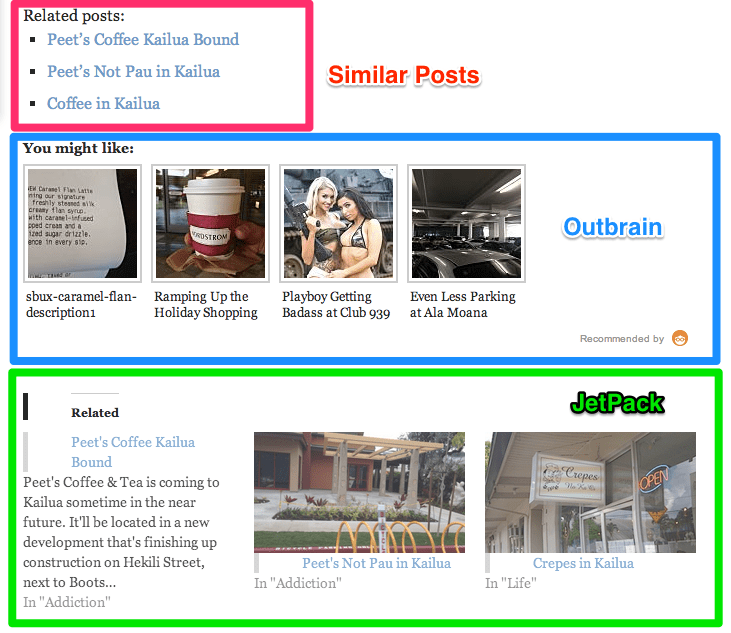
Similar Posts and JetPack have very similar recommendations with Similar Posts showing a more relevant “Coffee in Kailua” over “Crepes in Kailua.” I’m not sure where Outbrain is going with recommendations relating to Club 939 and less parking at Ala Moana.
Here is another example from the popular post, 21 Slang Words You Should Know Before Visiting Hawaii (Part 1).

Again, Similar Posts and JetPack overlap their similarities and rightfully link to Part 2 of the slang list. Outbrain goes on another tangent, suggesting pre-ordering Frozen, a virtual browser, a Buttnut, and another Club 939 post. What’s with Outbrain and Club 939?! Outbrain does say that it provides smarter engagement catering to the audience, so who knows? Maybe pulpy readers are more enthralled with Club 939 and Buttnut donuts.
Anyways, I’ll eventually pick one (or two) of these similar posts providers for the discovery of additional pulpy content. Which one I’m not sure about, but it is funny to see the comparisons.